1. Sridhar Katakam
Keep track of blogs and leave comments on them. A good way to keep the conversation going is to install a MyBlogLog widget and visit the blog of people visiting your site.
2. Ian Delaney
Nothing creates long-term traffic more than value. Consider writing posts with resources or explaining how things work. Useful things get linked to and they get onto del.icio.us, which is far better long-term than a digg front page.
3. Scott Townsend
Inform search engines and aggregators like Technorati (using the ping functionality) when your blog is updated, this should ensure maximum traffic coming from those sources. (check the List of Ping Services)
4. Kyle
Simplify. Pay attention to complex issues in your field of work. It may be a big long publication that is hard to wade through or a concept that is hard to grasp. Reference it and make a shorter “for dummies” version with your own lessons learned and relevant tips. When doing this, I have been surprised to find that the simplified post will appear before the more complex version in search results. Perhaps this is why it results in increased traffic; people looking for more help or clarification on the subject will land on your blog.
5. Grant Gerver
Try to be polemic. I write obsessively about all-things political from the left-wing perspective in the form of humorous, sarcastic one-liners.
6. Daniel
A simple tip that will probably boost your page views: install a translator plugin. I decided to use a paid plugin for this, but if I am not wrong there are some free ones as well. The translation is not very good, as you can imagine, but it helps to attract readers that are not fluent in English.
7. Rory
Submit articles to blog carnivals (http://blogcarnival.com) that are related to your niche. Your article almost always gets posted, and it must generate a handful of visitors, at least.
8. Ramen Junkie
Newsgroups. I always see a spike when I post a review to a newsgroup.
9. Eric Atkins
Create a new design for your website. Not only will it be more attractive to your regular readers, but you can submit it to some CSS gallery showcase sites that feature great designs. This will give you exposure on those sites while generating a lot of traffic and backlinks from those types of sites.
10. Megan Taylor
Participate in conversations on related blogs. Start conversations on your own blog. Don’t just post about a story and leave it at that, engage your audience, ask questions and call to action.
11. Guido
Comment on blogs, write useful content and make good friends on forums.
12. Brian Auer
You must be active to generate traffic. I post comments on other blogs that are related to mine, and I post my site link in my signature at the forums. Spread the word about your blog and it will certainly attract readers.
13. Shankar Ganesh
Just browse around MyBlogLog.com and you will surely get visitors to your blog. Also try to join as many communities as possible that are related to your topic.
14. Andrew Timberlake
A great tip for generating traffic is off-line by including your url in all your off-line liturature from business cards, letterheads, pamphlets, adverts through in-store signage if applicable. I even have our website on my vehicle.
15. Cory OBrien
Read lots of other blogs. Leave trackbacks. Make sure your blog is optimized for search engines. Leverage social bookmarking sites like digg (both for new ideas and for traffic).
16. Jester
Leave comments on other blogs. If you’re already reading them, it takes
just a couple of seconds to leave a message agreeing or disagreeing
with the author, you get to leave a link to your site, and you will almost
ALWAYS get traffic from your comments.
17. Goerge Manty
Post 3-5 times a day. Use ping services like pingomatic or set up wordpress to ping some of the ping services. Engage your readers. Put up polls, ask them questions, give them quizes, free tools, etc. Make them want to come back and tell their friends about you.
18. Engtech
Community. It’s one word but it is the most important one when it comes to blogging. The only “blog metric” that makes sense is the vibrant community of readers it has. Building a community around your blog will bring you increased traffic, but how do you start? The boilerplate response to building traffic is always “SEO, social networking sites, and commenting on blogs” but it can be simplified to “be part of a community”. The easiest way to seed your blog is with an already existing community. But the only way to do that is to be part of the community yourself.
19. Chris
Squidoo Lenses are a good way to generate traffic. By using a lense,
you can generate your own custom “community” of webpages, including some
of the more popular pages in your “neighborhood.” Including your own
webpage in such a list is a good way of generating traffic.
20. Splork
I’ve had good success writing articles and submitting them to EzineArticles. Articles that have been written from well-researched keyword phrases and accepted by EzineArticles tend to rank very high in Google for that search term. Placing anchor text in the footer of those articles so the reader can visit my relevant website has always increased my site traffic.
21. Jen Gordon
I came upon some unexpected traffic when my blog popped up on some css design portals like www.cssmania.com and www.webcreme.com. If you can put some time into the concept behind and design for your blog, I’d recommend submitting your site to a design portal not only for
additional traffic but to build an additional community around your site.
22. Kat
I’ve recently gotten involved with several “MySpace-like” community sites that focus on my target audience. I share my thoughts in their forums, post intros to my real blog on their system blog and I’ve even created a group for my specific niche. It’s been very, very successful for me.
23. Inspirationbit
Well, obviously everyone knows that social bookmarking sites like Digg, del.icio.us, etc. bring lots of traffic. But I’m now submitting some of my articles to blogg-buzz.com (a digg like site for bloggers), and I always get not a bad traffic from there.
24. Mark Alves
Participate in Yahoo Answers and LinkedIn Answers where you can demonstrate your expertise, get associated with relevant keywords and put your URL out there.
25. Tillerman
Be the first to write a post about the ‘Top Ten Blogs’ in your niche. The post will rank highly in any general search for blogs in your niche and other bloggers in your niche write about the post and link to it.
26. Nick
Participating in forums is a great way to get loyal readers. Either link baiting people in your signature or posting great advice and tips will give you high quality traffic, which will result in return visitors.
27. Brandon Wood
A simple trick I’ve used to increase traffic to my blog is participate in group writing projects. In fact, that’s what I’m doing right now.
28. Alan Thomas
Don’t forget your archives. I just posted a roundup of all interviews I did over the past seven months. One of them generated a new link and a big traffic spike from a group of users that look like they will be loyal readers now.
29. KWiz
Write something controversial. I don’t think it’s good to write something controversial just for the purpose of getting traffic necessarily (especially if it’s only for that purpose and you’re being disingenuous), but it works.
30. Dennis Coughlin
Find the best blogs on your niche and contact the authors. Introduce yourself and send a link of your blog. This might help them to discover your blog, read it and possibly link to it.
Source: http://www.dailyblogtips.com
Dec 13, 2007
30 Traffic Generation Tips

How to display your logo on Browser address bar?
Favicon Tutorial: Display Your Logo on Browser Address Bar or Favorites Menu
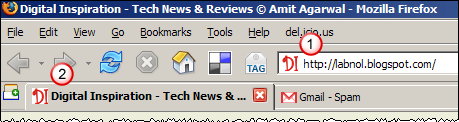
DI Reader Aboli Salvi is looking for ways to add a favicon [or bookmark icon] to her blog [like the ones you see in the screenshot above]
I am trying to change the favicon for my blog. But not much information is available on the net. Could you please post about how to go about doing this?
Favicon is basically a tiny 16x16 .ico graphic file which is displayed in the browser address bar, links bar, desktop internet shortcuts, favorites menu, browser tabs and also next to your blog feed in RSS readers. While most favicons are static images, some new browsers now support animated GIFs or the transparent PNG formats [alpha channel].
Before we get into the process of creating favicon ico files and putting them to our blogs, here are some common myths that are really not true: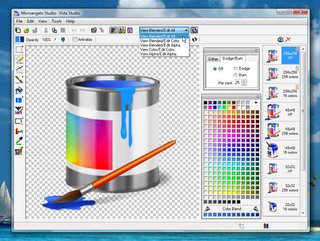 1. You don't need the expensive Photoshop or Corel Draw to create .ico files.
2. The favicon .ico files can have any file name and you are not limited to favicon.ico
3. While .ico is short for Windows icon, your favicons should appear perfect in Mac and other non-Windows systems.
4. Favicons can be created from pictures or even text but if you want to have those professional looking aqua style 3d icons, consider investing in Microangelo Icon Editor.
5. Like logos and web graphics, icons are also under copyright laws. While there are tons of programs that would let you extract ico files from Microsoft Office executables or dll files, think twice before putting them on your own site.
6. For basic icon editing, Irfanview with icon plugin is good enough for most of us.
OK, now let's get to the basics of creating favicons for your blog:
Step 1: Choosing a picture for favicon
While you can create a favicon from an image of virtually any size, it is not a good approach as the image would be squeezed to a 16x16 graphic and people won't be able to make any sense out of it.
What I would suggest is that you open your picture or logo in any photo editing software [like Picasa, Paint.NET or online image editors] and crop the image in 1:1 proportion of lenght:width keeping only the relevant portions.
For instance, if you want to show your own picture as the favicon, you might trim down everything other than your face. If you decide to have your full body and also the trees in the background, that would make your favicon less appealing.
Step 2: Creating a favicon from the picture This is the easiest part though most people think otherwise. Once you have the image ready from step 1, upload your picture here [Favicon from Pics] and click generate favicon.ico
You will immediately get a zip file containing some four files including the favicon.ico. Extract that lone file to your hard disk and you might also rename it while keeping the ico extension inact.
Step 3: Upload the favicon file to your web server
If you have your own web space, you can upload the file their but if you are using a free blog service like Blogger, you may use Googlepages to host that favicon file. Once uploaded copy the web location of the file which will be required in the next step.
Step 4: Modify your blog template, publish
This is the last step. We might have to do some HTML coding but it's very simple and even your mom should be able to do it.
Right inside the section, you may find some meta tags and link tags. Leave them as such and look for the line that says
Just above the closing head tag, add the following lines:
<link rel="icon" href="www.abc.com/myicon.ico" type="image/x-icon">
<link rel="shortcut icon" href="www.abc.com/myicon.ico" type="image/x-icon">
The value of href will have the full permanent link of the ico file which you copied in Step 3.
Now press the save button and republish your blog template.
When you decide change your blog favicon in future, you can just replace the icon file with another version. If you keep the file name same, you may not have to make any changes to your blog templates - the changes will propogate automatically. Now how cool is that.
Source: http://labnol.blogspot.com/2006/09/favicon-tutorial-display-your-logo-on.html


